
 By
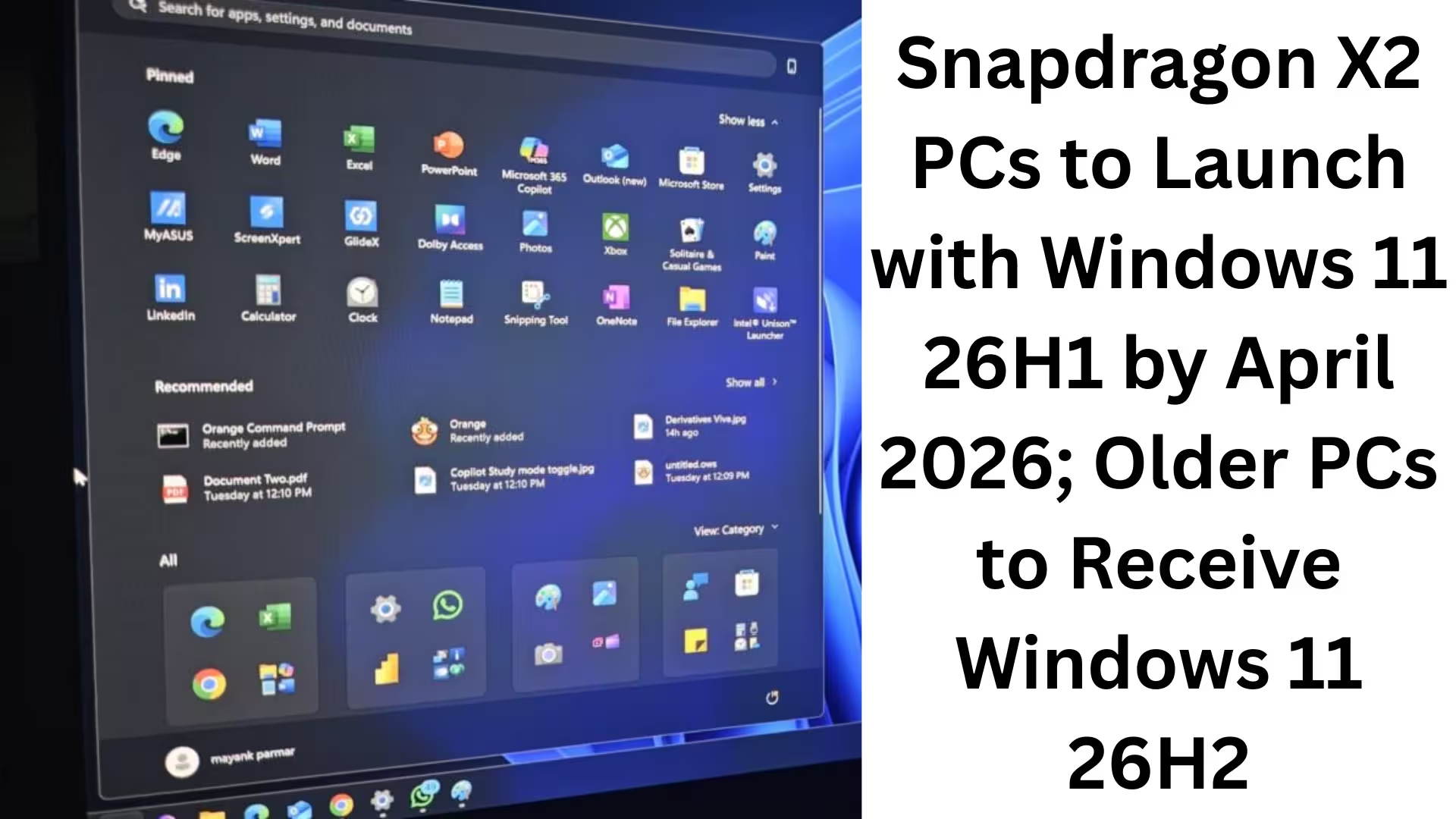
ByWe are entering a period of significant change in the Windows ecosystem, where Microsoft, Qualcomm, and the Arm64 platform are working together to reshape the future of Windows 11. The arrival of new Snapdragon X2-based PCs with Windows 11 26H1 is a major part of this transformation. This update is completely different from traditional Windows updates and will not directly affect older Intel and AMD-based PCs.
In this detailed article, we present all the important information related to Windows 11 26H1, Snapdragon X2, Arm64 PCs, and Windows 11 26H2 in detail, so that you can fully understand this change.
Qualcomm Confirms: Snapdragon X2 PCs Shipping by April 2026
A Qualcomm official spokesperson has clarified that the shipping of new PCs based on the Snapdragon X2 processor will begin by the end of the first quarter of 2026, i.e., around April 2026. This is the same timeframe in which Windows 11 26H1 is expected to be publicly released.
Microsoft has already confirmed that it is testing Windows 11 26H1 for new CPUs. Qualcomm’s timeline reinforces the fact that Windows 11 26H1 is specifically designed for the Snapdragon X2 lineup.
What is Windows 11 26H1, and who is it for?
Windows 11 26H1 is not a typical feature update. This update:
It is only for new Arm64 PCs
Only supports Snapdragon X2 Plus, Elite, and Extreme SoCs
Will not be available for existing Intel and AMD-based PCs
Microsoft has clearly stated that Windows 11 26H1 should not be considered an upgrade. It is a platform-level release aimed at supporting new hardware. Why Older PCs Won’t Get Windows 11 26H1
If you have a PC with an Intel or AMD processor, you will never receive Windows 11 26H1. However, this is not a cause for concern.
We want to clarify that:
26H1 does not contain any major user-facing features.
This update is limited to hardware support and system-level changes.
The real and significant features will arrive with Windows 11 26H2.
Therefore, Windows 11 26H2 will be the main update for existing PCs.
Windows Insiders and the ‘Bromine’ Platform Release
Microsoft began providing preview builds of Windows 11 26H1 to Windows Insiders as early as November 2025. These builds are based on a new platform release, codenamed ‘Bromine’.
At that time, Microsoft clearly warned that:
> Windows 11 26H1 is only for “platform changes” and should not be considered an upgrade.
It is now clear that these platform changes were necessary for the Snapdragon X2 SoC.
Microsoft’s Official Statement: 26H1 is Not a Feature Update
In its November 2025 blog post, Microsoft explicitly stated:
> “26H1 is not a feature update for version 25H2. It only includes platform changes to support specific silicon.”
This means that:
Users do not need to take any action.
There are no migration concerns for IT administrators.
This release is entirely for OEMs and hardware partners.
Windows 11’s Annual Update Model Remains
Microsoft has also reiterated that the annual feature update cadence for Windows 11 will not change.
According to us, this means:
One major feature update every year.
This update is usually released in October–November.
Windows 11 26H2 will follow this pattern.
Windows 11 26H2: The Real Update for All PCs
Windows 11 26H2 is the update that all Windows users should be waiting for. Key highlights of this update:
Scheduled for release in October 2026
Available for Intel, AMD, and Arm64 platforms
Will include new features, UI improvements, and AI integration
This is the update that will bring all the 26H1 changes to the mainstream
Why is Microsoft creating Windows 11 26H1?
Microsoft’s official reason: To support new processors.
We understand that:
New SoC designs require
Power States
Windows Scheduler
Firmware Integration
AI Acceleration Pipelines
and other system-level changes.
This is why Microsoft has created a “new platform baseline” so that:
OEMs can easily manufacture and validate devices
Devices launched in the first half of the year can have a stable OS
What’s changed in the Windows 11 26H1 preview?
According to our testing:
The build number has increased to 28000
No major visual or UI changes are apparent
On Copilot+ PCs:
The AI Agent is enabled by default in Settings
It suggests system settings based on AI usage patterns
Minor UI improvements are possible, but no major changes are visible out-of-the-box.
Snapdragon X2 and the future of Windows
The focus of Windows with Snapdragon X2 is clear:
Improved battery life
Always-connected PCs
On-device AI processing
Direct competition with Apple Silicon
Windows 11 26H1 is the first strong step in this direction.
Our Conclusion
We clearly see that:
Windows 11 26H1 is a hardware-centric platform update.
It is exclusively for new Arm64 PCs based on the Snapdragon X2.
Existing PCs will receive the truly new features with Windows 11 26H2.
Microsoft’s annual update model remains fully intact.
For users planning to buy new Snapdragon X2 PCs, Windows 11 26H1 will provide a stable and future-ready foundation. Existing users, however, should wait for Windows 11 26H2, as that update will bring significant changes for everyone.
Are you searching for the best hosting plan? Click now and get 20% off
FAQ – Frequently Asked Questions about Snapdragon X2, Windows 11 26H1, and Windows 11 26H2
Question 1: What is Windows 11 26H1?
Answer: Windows 11 26H1 is a platform-level release designed by Microsoft to support new Arm64 processors, specifically the Snapdragon X2 lineup. It is not a typical feature update.
Question 2: Which PCs will receive Windows 11 26H1?
Answer: Windows 11 26H1 will only be available on new Arm64 PCs featuring Snapdragon X2 Plus, Elite, and Extreme processors.
Question 3: Will Intel or AMD PCs receive Windows 11 26H1?
Answer: No. Existing PCs with Intel and AMD processors will not receive Windows 11 26H1.
Question 4: Why is the Windows 11 26H1 update necessary?
Answer: This update is necessary for system-level changes related to the new processor architecture, power management, Windows scheduling, and firmware support.
Question 5: Will Windows 11 26H1 include new features?
Answer: No. It does not include any major user-facing features. It only implements changes related to hardware support.
Question 6: What is the difference between Windows 11 26H1 and 26H2?
Answer:
26H1: Only for new Snapdragon X2 PCs, no major features
26H2: For all PCs, includes new features, UI improvements, and AI enhancements
Question 7: When will Windows 11 26H2 be released?
Answer: Windows 11 26H2 is expected to be released in October 2026, as indicated by Microsoft’s annual update schedule.
Question 8: Will existing PCs receive Windows 11 26H2?
Answer: Yes. All existing Windows 11-supported PCs with Intel, AMD, and ARM64 processors will receive Windows 11 26H2. Question
9: When will Snapdragon X2 PCs be launched?
Answer: According to Qualcomm, new PCs based on Snapdragon X2 will begin shipping by April 2026.
Question 10: Can Windows 11 26H1 be considered an upgrade?
Answer: No. Microsoft has clearly stated that Windows 11 26H1 is not an upgrade, but rather a platform support release.
Question 11: When did Windows 11 Insiders start testing 26H1?
Answer: Since November 2025, Windows Insiders have been testing Windows 11 26H1, which is based on the platform codenamed ‘Bromine’.
Question 12: Which update should regular users wait for?
Answer: Regular users should wait for Windows 11 26H2, as that update will bring new features and changes for everyone.
Also read:
How to Keep WhatsApp Always Online: 7 Effective Methods (2026 Guide)
Samsung Galaxy S26 Ultra Receives New Launch Date Update – Get All the Details
Images Not Downloading from Google Chrome on Android?
7 Best and Effective Ways to Block Spam Calls on iPhone (2026 Guide)
Microsoft’s Windows 11 SE: An OS that challenged ChromeOS, now set to become history in 10 months
Microsoft will now let you share app windows directly with Copilot from the Windows 11 taskbar
Another new model of AirPods Pro 3 is coming: The next big upgrade with an IR camera
How to Remove api.cactus-search.com (All Methods) – Complete Information
How to Normalize Volume in Windows 11 – Complete Step-by-Step Guide
How to Launch Multiple Apps Simultaneously in Windows – A Complete and Effective Guide
Are you searching for the best hosting plan? Click now and get 20% off

[…] Snapdragon X2 PCs to Launch with Windows 11 26H1 by April 2026; Older PCs to Receive Windows 11 26H2 […]