
 By
ByA new era of AI in Windows 11: A big step towards agentic experiences
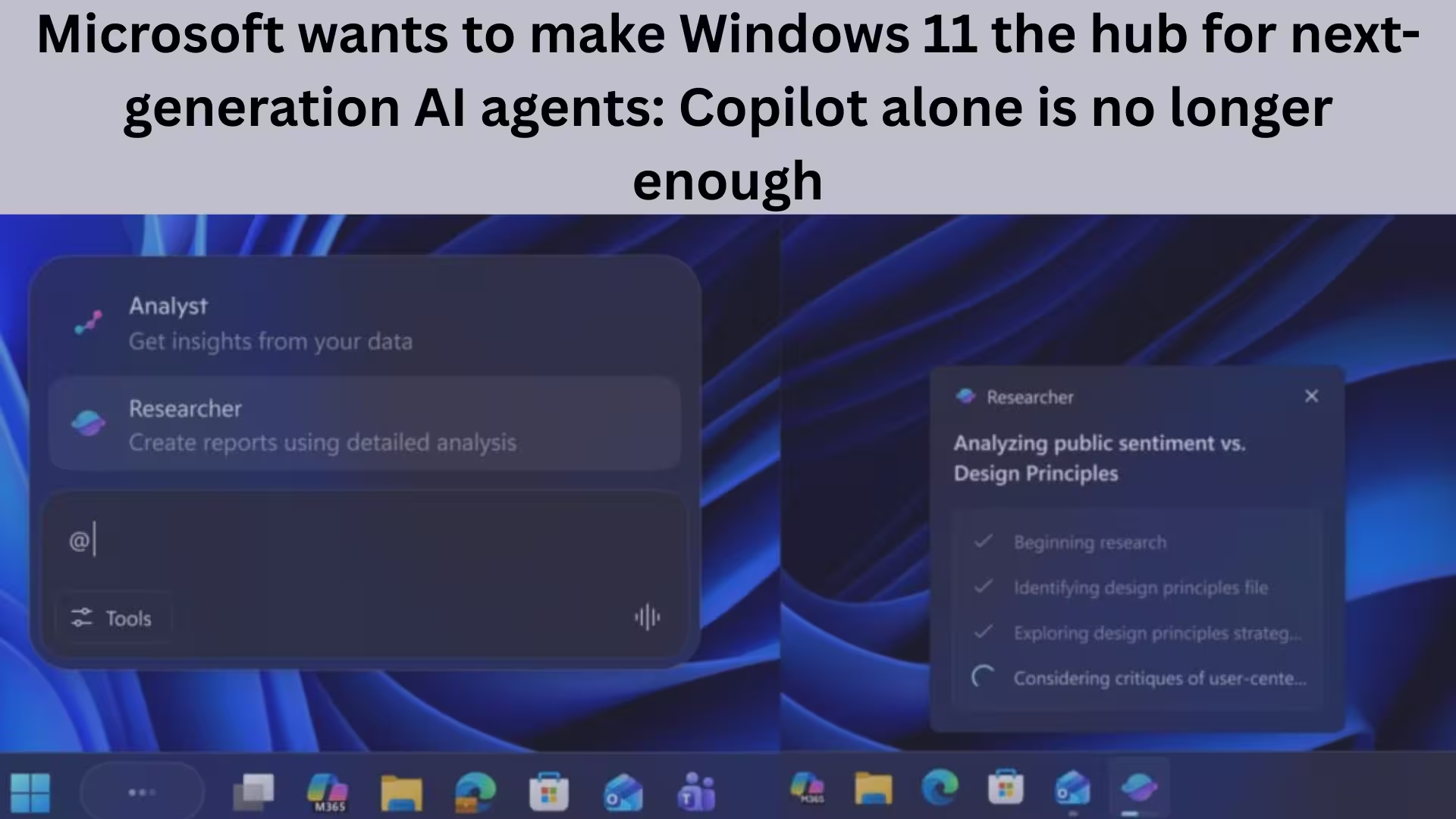
Microsoft is now clearly aiming to transform Windows 11 from just an operating system into an “agentic AI platform.” Despite Copilot and Microsoft 365 Copilot, the company has realized that a single AI assistant won’t meet future needs. This is why Microsoft is now actively encouraging developers to create next-generation AI agents.
Amidst the hustle and bustle of CES 2026, Microsoft quietly hinted on X (formerly Twitter) that Windows 11 is about to become the home for agentic experiences. This is not a minor change, but a major shift in Windows’ entire AI vision.
Model Context Protocol (MCP): A strong foundation for AI in Windows 11
Microsoft has confirmed that Windows 11 has native support for MCP (Model Context Protocol). MCP is an open-source protocol that allows generative AI to securely connect with external tools, data, and system resources.
This directly means:
AI agents can work with local files, system data, and third-party tools
Every action is secure and auditable
Developers don’t have to resort to various workarounds for AI integration
Windows 11 is no longer just “running” AI, but making AI an integral part of the system.
Experiential Agentic Experiences: AI agents running in the background
The new “Experiential Agentic Experiences” toggle added to Windows 11 preview builds further clarifies Microsoft’s strategy. This feature allows Windows to keep AI agents constantly active in the background. Its benefits:
AI agents can interact with the system in real time
Automation becomes faster and smarter than ever before
Windows begins to transform from a reactive OS to a proactive OS
Microsoft claims that native MCP support + the new agent workspace make Windows 11 the most suitable platform for next-gen agent development.
Microsoft’s strategy: Making Windows an Agentic OS
It’s clear that this isn’t just a feature update, but part of a long-term strategy. Microsoft knows it can’t make Windows 11 agentic on its own. Steve Ballmer’s famous quote — “Developers, developers, developers” — is still as true today as it was then.
For Windows 11 to truly become agentic, it needs:
Third-party apps
Unique AI agents
Real-world use cases
Until developers create AI agents for Windows that improve everyday tasks, the perception of ordinary users won’t change.
AI in Windows 11: Reality vs. Claims
There’s also a harsh reality — the AI features currently in Windows 11 aren’t as useful as they should be.
Features available on Copilot+ PCs, such as:
Windows Recall
Copilot Vision
Copilot Actions
are either useless or create a lack of trust for many users and IT administrators. Recall, which records the screen, raises privacy concerns, while Copilot Vision and Actions don’t make a significant difference in everyday tasks.
The Developer’s Perspective: The Real Need for MCP and Agentic Features?
From a developer’s perspective, the question arises —
Are these agentic AI features of Windows 11 necessary for everyday development work?
For developers working on tech stacks like Flutter/Dart:
Windows Terminal is already sufficient
Tools like Claude Code are effective even without MCP
More AI layers sometimes complicate things rather than simplify them
AI is only useful when the user fully understands what it’s doing. Microsoft Copilot vs. Competitive AI Tools
Microsoft also needs to understand that Copilot currently lags behind its competitors, especially in Office apps.
Copilot in PowerPoint:
Fails to create visually appealing slide designs
Doesn’t properly follow modern design trends
Generates basic templates and inaccurate content
Today, there are startups that have created AI presentation tools superior to Copilot in less than a year.
The need to make AI useful, not just force it upon users
Microsoft needs to decide:
Is AI merely a way to please shareholders?
Or is AI truly intended to enhance the productivity of users and IT administrators?
At least in Windows 11:
There should be a single master toggle to disable all AI features
Users should have control over which AI tools they want to use
The focus should be on quality AI features, not quantity
The future of Windows 11: With AI or burdened by AI?
If Microsoft works in the right direction, Windows 11 could:
Become the world’s first truly agentic OS
Prove to be the most powerful AI platform for developers
Truly simplify users’ daily tasks
But if AI features continue to be added without a solid use case:
Windows 11 will become unnecessarily complex
User trust will diminish
AI will become a burden instead of an opportunity
Conclusion: Time to think beyond Copilot
Microsoft’s move clearly demonstrates that Copilot alone is not enough for the AI future of Windows 11. The real power lies in the hands of developers, who can populate Windows with AI agents that connect, automate, and act confidently.
The question is no longer whether Windows 11 will have AI, but rather how useful, reliable, and controllable that AI will be.
Are you searching for the best hosting plan? Click now and get 20% off
Frequently Asked Questions (FAQ)
Question 1: Why does Microsoft want to make Windows 11 an “Agentic OS”?
Answer: Microsoft aims to make Windows 11 a platform where AI agents don’t just act on commands, but continuously interact with the system, apps, and data in the background. This will enable automation, increased productivity, and smarter workflows.
Question 2: Why is Microsoft emphasizing new AI agents despite having Copilot?
Answer: Copilot is a general AI assistant, while Microsoft believes the future lies in specialized and task-focused AI agents. Copilot alone cannot cover every use case, which is why a multi-agent ecosystem is being promoted in Windows 11.
Question 3: What is the Model Context Protocol (MCP)?
Answer: MCP is an open-source protocol that allows AI models to securely connect with external tools, system data, and applications. Native support for MCP in Windows 11 allows developers to easily create powerful AI agents.
Question 4: What does the Experiential Agentic Experiences feature do?
Answer: This feature allows Windows 11 to keep AI agents constantly active in the background. This means the AI can work with the system in real-time, and the user doesn’t need to issue commands every time.
Question 5: Are the AI features in Windows 11 currently useful?
Answer: Currently, many users feel that features like Windows Recall, Copilot Vision, and Copilot Actions are not very helpful in practical use. Questions regarding privacy, control, and usability still remain.
Question 6: How beneficial is the new AI system in Windows 11 for developers?
Answer: This system is full of possibilities for developers, but it will only be beneficial if the AI agents solve real-world problems. Simply adding AI features is not enough; creating useful and transparent agents is crucial.
Question 7: What is the difference between Copilot and other AI tools?
Answer: Copilot currently lags behind competing AI tools in several areas, especially in apps like PowerPoint. Newer startups have already introduced better design and content generation tools in a shorter timeframe.
Question 8: Can users disable all AI features in Windows 11?
Answer: Currently, Windows 11 does not have a single master toggle to disable all AI features at once. This is why users and IT administrators are demanding more control from Microsoft.
Question 9: Will AI in Windows 11 improve in the future?
Answer: If Microsoft focuses on user needs and developer innovation, Windows 11 can become a very powerful AI platform. However, if it goes in the wrong direction, AI could become a burden rather than a useful tool.
Question 10: What is the true future of AI in Windows 11?
Answer: The true future of AI in Windows 11 depends on third-party AI agents, better control, and real-world utility. Copilot is just the beginning; the real game is in next-generation agentic experiences.
Also read:
Separate Changelog for AI Components in Windows 11: Microsoft’s New Strategy
Snapdragon X2 PCs to Launch with Windows 11 26H1 by April 2026; Older PCs to Receive Windows 11 26H2
How to Keep WhatsApp Always Online: 7 Effective Methods (2026 Guide)
Samsung Galaxy S26 Ultra Receives New Launch Date Update – Get All the Details
Images Not Downloading from Google Chrome on Android?
7 Best and Effective Ways to Block Spam Calls on iPhone (2026 Guide)
Microsoft’s Windows 11 SE: An OS that challenged ChromeOS, now set to become history in 10 months
Microsoft will now let you share app windows directly with Copilot from the Windows 11 taskbar
Another new model of AirPods Pro 3 is coming: The next big upgrade with an IR camera
How to Remove api.cactus-search.com (All Methods) – Complete Information
How to Normalize Volume in Windows 11 – Complete Step-by-Step Guide
How to Launch Multiple Apps Simultaneously in Windows – A Complete and Effective Guide
Are you searching for the best hosting plan? Click now and get 20% off
[…] Also read: Microsoft wants to make Windows 11 the hub for next-generation AI agents: Copilot alone is no longer… […]
[…] Also read: Microsoft wants to make Windows 11 the hub for next-generation AI agents: Copilot alone is no longer… […]