 By
ByIn today’s world, the iPhone True Tone feature has become an incredibly important and useful technology that completely transforms your screen experience. If you want to know what True Tone is on the iPhone, how it works, and how to turn it on or off, then this detailed guide is for you.
What is True Tone? (What is True Tone on iPhone)
True Tone is an advanced display technology on the iPhone that automatically adjusts your screen’s colors and white balance to match the ambient lighting in your surroundings.
Simply put:
If you are in yellow light (warm light) → the screen will appear slightly yellow.
If you are in white or cool light (cool light) → the screen will look cool (blue-ish).
This makes the screen appear more natural and comfortable.
This is why people often ask:
What does True Tone do on iPhone?
True Tone iPhone meaning
What is True Tone on iPhone?
How Does True Tone Work? (How Does True Tone Work)
The advanced sensors built into the iPhone detect the light in your surroundings and adjust the display accordingly.
The process works as follows:
1. The ambient light sensor measures the lighting in the environment.
2. The iPhone processes that data.
3. It adjusts the screen’s colors and white balance.
This provides you with:
A more natural viewing experience.
Reduced strain on your eyes.
What is the Purpose of True Tone? (Purpose of True Tone in iPhone)
The purpose of True Tone is not merely to make the display look aesthetically pleasing, but to enhance usability.
Key Benefits:
Increases eye comfort.
Makes the screen appear more true-to-life.
Facilitates comfortable phone usage for extended periods.
This is why people ask:
Does True Tone reduce eye strain?
Does True Tone help your eyes?
Answer: Yes, it helps provide relief to your eyes.
True Tone ON or OFF – Which is Better?
This is a common question:
True Tone ON or OFF – Which is the right choice? Benefits of Keeping True Tone ON:
Comfortable for the eyes
Natural colors
Better for night usage
Also read: How to Fix the ‘Driver Power State Failure’ BSOD Error in Windows
When to Turn True Tone OFF:
When editing photos
When color accuracy is required
For professional work (designing, etc.)
Conclusion:
It is better to keep True Tone ON for daily use.
Does True Tone Drain Battery?
Many people ask:
Does True Tone drain the battery?
The truth is:
True Tone consumes very little battery power
Its impact is almost negligible
Therefore:
It is not necessary to turn it off to save battery life.
Does True Tone Reduce Blue Light?
This is also a common query:
Does True Tone reduce blue light?
Answer:
True Tone is not a direct blue light filter
It merely adjusts the color temperature
If you want to reduce blue light:
Use Night Shift Mode
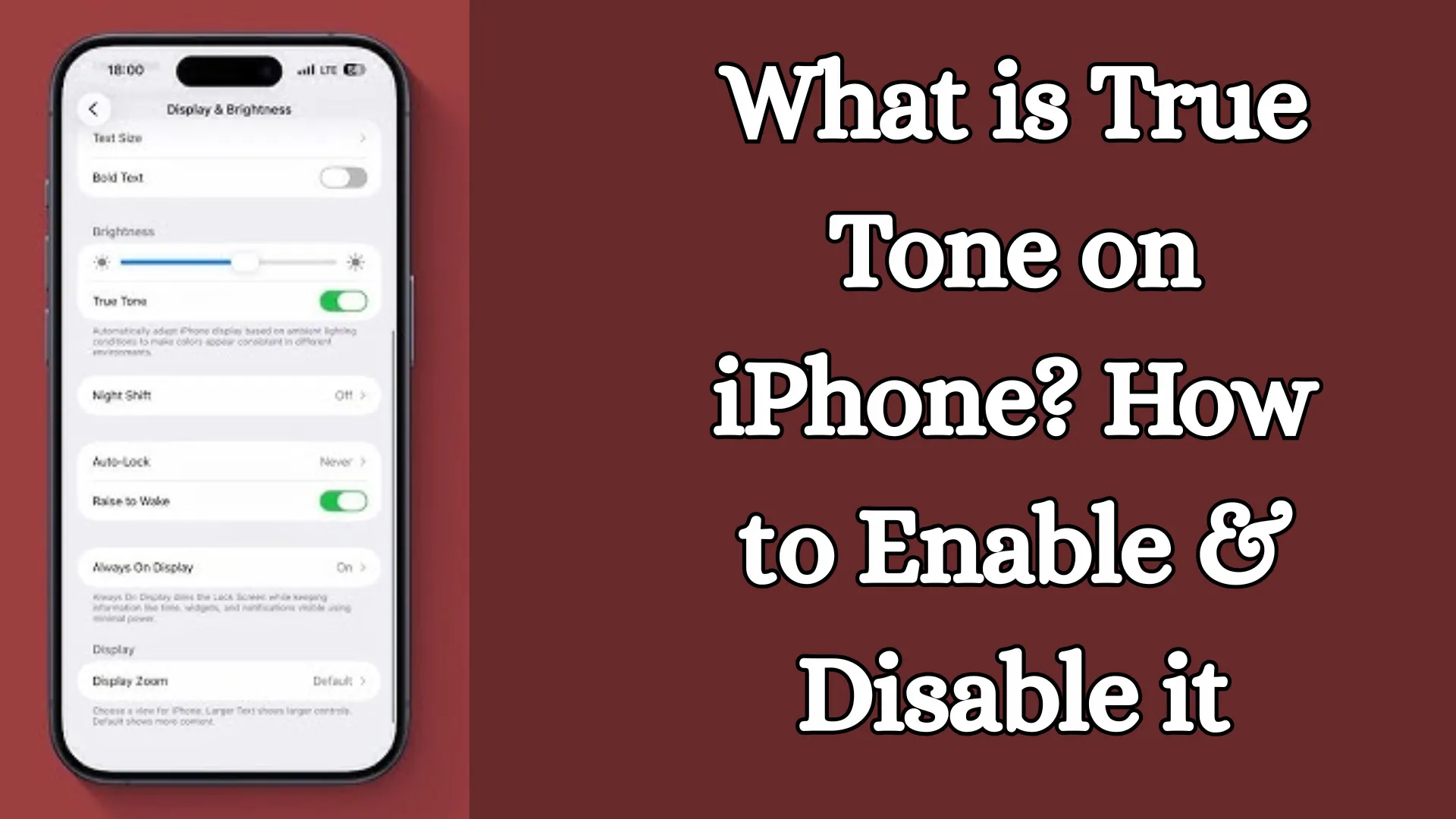
How to Turn ON True Tone on iPhone
Enabling True Tone is very easy:
Method 1: Via Settings
1. Open Settings
2. Go to Display & Brightness
3. Turn ON True Tone
Method 2: Via Control Center
1. Open Control Center
2. Press and hold the Brightness slider
3. Turn ON True Tone
How to Turn OFF True Tone on iPhone
If you wish to disable True Tone:
Steps:
1. Settings > Display & Brightness
2. Toggle True Tone OFF
The process is the same for:
Turning off True Tone on iPhone
Disabling True Tone on iPhone
Also read: Services.msc Not Opening in Windows? 11 Best Ways to Fix It Instantly
On Which iPhone Models is True Tone Display Available?
The True Tone Apple feature is available on several iPhone models:
iPhone 8 and later models
iPhone X, XR, XS
iPhone 11, 12, 13, 14 series
This is why people search for:
iPhone 11 True Tone
iPhone X True Tone
True Tone on iPhone 14
True Tone vs. Night Shift – What is the Difference?
| Feature | True Tone | Night Shift |
| ——- | ————————— | ——————— |
| Purpose | Color adjustment | Blue light reduction | | Function | Adjusts based on lighting | Corrects for warm tones |
| Usage | All-time use | Night use |
These two features are distinct, yet they can be used in conjunction.
Benefits of True Tone (Importance of True Tone on iPhone)
1. Natural Viewing Experience
The screen appears true-to-life.
2. Eye Protection
Reduces strain on the eyes.
3. Enhanced Reading Experience
Makes reading for extended periods easier.
4. Automatic Adjustment
Eliminates the need for manual settings.
Disadvantages of True Tone
While the benefits are significant, there are a few limitations:
Color accuracy may vary slightly.
Not ideal for graphic designers.
Some users may not prefer the warm tone.
When Does True Tone Not Work?
If the True Tone option is not visible on your iPhone, the cause may be one of the following:
The screen has been replaced (non-original display).
Sensor damage.
Software issues.
To fix this:
Install an original display.
Update the software.
True Tone Settings and Controls
You can easily manage True Tone:
ON/OFF toggle.
Quick access via the Control Center.
Customization through Display Settings.
Conclusion: Making the Most of the iPhone True Tone Feature
The True Tone iPhone feature is a smart and essential technology that enhances your screen viewing experience. It not only makes colors appear more natural but also aids in protecting your eyes.
If you are a daily user:
Keep True Tone ON.
If you perform professional work:
Toggle it ON/OFF as needed.
FAQ – Frequently Asked Questions About iPhone True Tone
1. What is True Tone, and how does it work on the iPhone?
True Tone is a smart display feature that automatically adjusts your iPhone screen’s color and white balance to match the ambient lighting in your surroundings, making the screen appear more natural and comfortable to view.
2. Is True Tone beneficial for the eyes?
Yes, True Tone reduces eye strain and provides greater comfort during prolonged phone usage. Therefore, this feature is considered highly beneficial for eye comfort.
3. Does True Tone consume a lot of battery power?
No, True Tone causes very minimal battery drain. Its impact on battery life is negligible—almost non-existent—so there is no downside to keeping it turned ON.
4. What is the difference between True Tone and Night Shift?
True Tone: Adjusts colors based on the surrounding ambient light.
Night Shift: Warms the screen’s color temperature by reducing blue light emission.
These two features are distinct, but they can be used in conjunction with one another.
5. Should I keep True Tone ON or OFF?
For daily use → It is better to keep it ON.
For photo editing or professional work → It is advisable to turn it OFF.
6. How do I turn ON True Tone on my iPhone?
Settings > Display & Brightness > Toggle True Tone ON
Alternatively, you can also enable it via the Control Center.
7. How do I turn OFF True Tone on my iPhone?
Settings > Display & Brightness > Toggle True Tone OFF
8. Does True Tone reduce blue light?
No, True Tone is not a direct blue light filter. For that, you should use Night Shift Mode.
9. Which iPhones have True Tone?
The True Tone feature is available on the iPhone 8 and almost all subsequent models, such as:
iPhone X, iPhone 11, iPhone 12, iPhone 13, iPhone 14, etc.
10. What should you do if the True Tone option is not visible?
The screen may have been replaced.
It may not be an original display.
There may be a software issue.
In this situation, you should have the device inspected at an authorized service center.
11. Is it safe to keep True Tone turned on all the time?
Yes, keeping it turned ON at all times is completely safe, and it enhances your viewing experience.
12. Does True Tone affect color accuracy?
Yes, there may be a slight shift in colors; therefore, it is better to keep it turned OFF for professional editing.
13. What is the main purpose of True Tone?
Its main objectives are:
To provide a natural display experience.
To reduce eye strain.
To perform automatic color adjustments.
14. Is True Tone good for gaming?
Yes, though if you require exact color representation, you can choose to turn it OFF. For general gaming, however, it is better to keep it ON.
15. Does True Tone work in every app?
Yes, it operates at a system-wide level, so its effects are visible across every application.