
 By
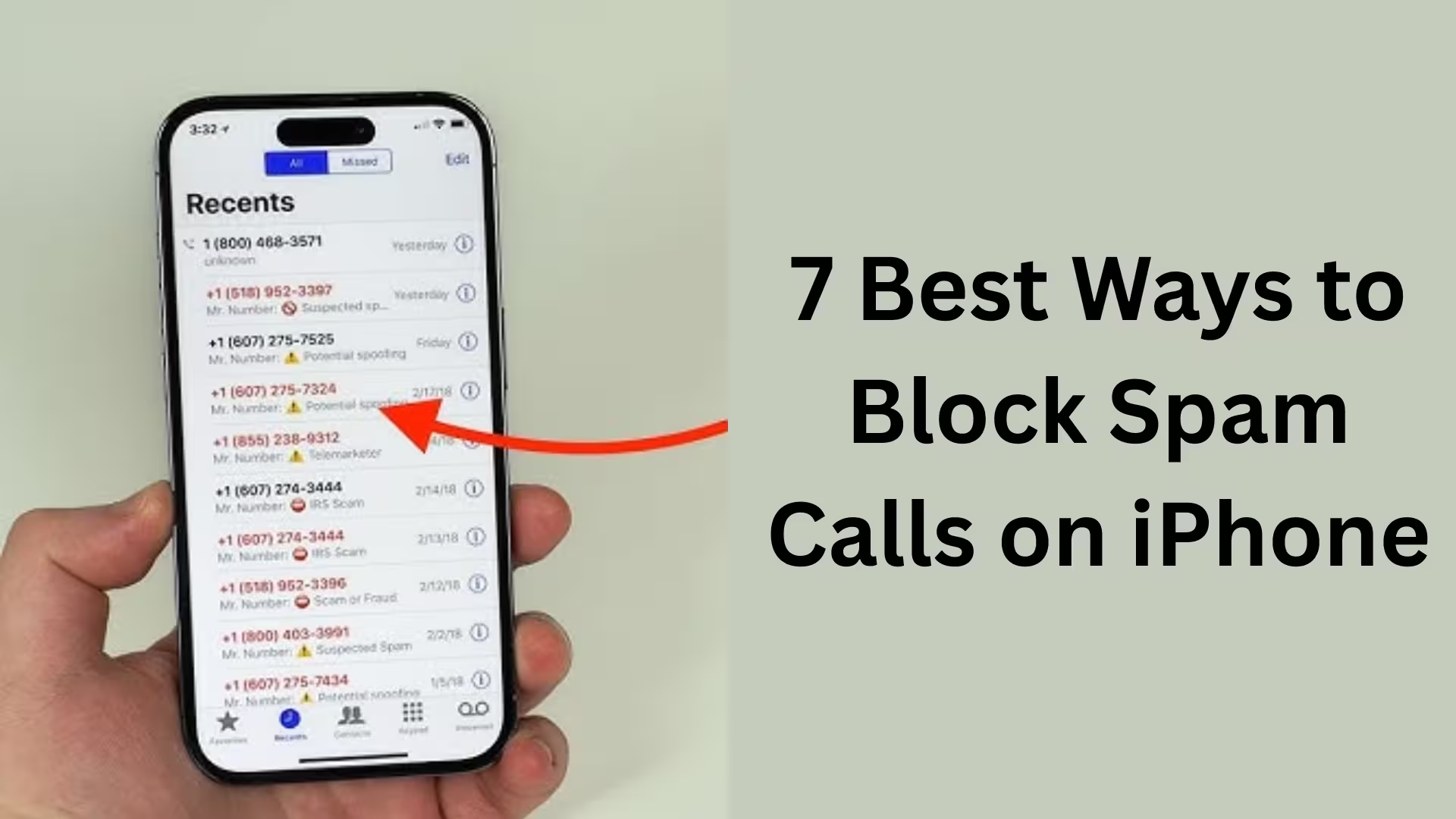
ByIn today’s digital age, spam calls and unwanted phone calls have become a major problem. Banking fraud, fake lottery offers, insurance offers, loan calls, and scammers are harassing iPhone users every day. We all want our iPhones to be safe, quiet, and distraction-free. To that end, we’ve created this detailed guide, sharing the 7 most effective ways to block spam calls on iPhone.
1. Use the iPhone’s “Silence Unknown Callers” feature
Apple has a very useful feature in iOS called Silence Unknown Callers. This feature automatically silences all calls that aren’t saved in your contacts list.
How to activate:
Open Settings
Go to Phone
Turn on Silence Unknown Callers
Benefits:
Calls from unknown numbers go directly to Voicemail
Recorded in the call history
Reduced risk of missing important calls
This method is best for users who are bothered by unknown calls on a daily basis.
2. Manually Blocking a Spam Number
If you’re repeatedly receiving spam calls from a particular number, blocking it directly is the simplest solution.
Steps:
Open the Phone App
Go to Recent Calls
Tap the (i) icon next to that number
Scroll down and select Block this Caller
This method is especially effective for targeted spam calls.
3. Use a trusted call blocking app like Truecaller
There are many spam call blocking apps available on the Apple App Store, but Truecaller is considered the most popular and reliable.
Key Benefits of Truecaller:
Real-time spam call identification
Global database of millions of numbers
Automatic call blocking
Caller ID feature
How to set up:
Install Truecaller from the App Store
Go to Settings → Phone → Call Blocking & Identification
Enable Truecaller
This method is perfect for users who want automatic spam protection.
4. Correctly Configure Call Blocking & Identification Settings
It’s crucial to correctly configure the Call Blocking & Identification settings on your iPhone.
Steps:
Open Settings
Phone → Call Blocking & Identification
Allow all trusted apps
This will allow your iPhone to identify and block spam calls.
5. Smart use of Do Not Disturb (Focus Mode)
If you only want important calls to come through, Focus Mode / Do Not Disturb is a great option.
How to set up:
Settings → Focus → Do Not Disturb
Select only Contacts or Favorites in Allowed Calls
Set a Schedule
Benefits:
Quiet during meetings or sleep
Spam calls are completely muted
Control is in your hands
6. Check Voicemail and Call History regularly
Sometimes spam calls leave messages on Voicemail. It’s important to check them periodically.
Our advice:
Delete suspicious Voicemail immediately
Block the same number
Report repeated calls
This habit can protect you from major fraud in the future.
7. Don’t share your number on unnecessary websites and apps
The biggest cause of spam calls is sharing your number in the wrong places.
Cautions:
Don’t enter your phone number on unknown websites
Avoid free coupons, lucky draws, and fake job offers
Grant app permissions carefully
Always remember, the less your number is shared, the fewer spam calls you’ll receive.
Additional Security Tips for iPhone Users
Always keep iOS updated
Pay attention to Apple’s security notifications
Never share OTPs or bank details on any call
If you have any doubts, hang up immediately
Conclusion
We believe that spam calls are not only a nuisance but also a security threat. By following all the methods mentioned above, we can make our iPhone spam-free, secure, and smart. Whether you use Apple’s built-in features or third-party apps, accurate information is the best weapon.
If we implement these 7 methods correctly, it is absolutely possible to get rid of spam calls.
Are you searching for the best hosting plan? Click now and get 20% off
Frequently Asked Questions (FAQ)
Question 1: Why do I receive spam calls on my iPhone?
Answer: The main reason for receiving spam calls on your iPhone is that your mobile number has been shared on unnecessary websites, apps, online forms, lucky draws, job portals, or promotional offers. Sometimes, data leaks or the sale of numbers by third-party companies also increase the number of spam calls.
Question 2: Does the iPhone have a built-in feature to block spam calls?
Answer: Yes, the iPhone has built-in features like Silence Unknown Callers and Call Blocking & Identification, which can easily silence or block unknown and spam calls.
Question 3: Does the Silence Unknown Callers feature block all calls?
Answer: No, this feature only silences calls from numbers that are not saved in your contact list. Calls from your saved contacts, recently called numbers, and numbers suggested by Siri will still come through normally.
Question 4: Is Truecaller safe for iPhone?
Answer: Yes, Truecaller is a reliable and popular app used by millions of iPhone users. However, for better privacy, it’s important to carefully manage the app’s Permissions and Privacy Settings.
Question 5: Can spam calls be completely stopped without any app?
Answer: Spam calls can be significantly reduced without any app, but completely eliminating them is difficult. Apple’s built-in features can block 60-70% of spam calls, while third-party apps provide even better protection.
Question 6: Does Do Not Disturb (Focus Mode) stop spam calls?
Answer: Focus Mode doesn’t directly block spam calls, but it mutes unwanted calls. This provides relief from constant disturbances, especially during meetings or at night.
Question 7: Can frequently occurring spam numbers be reported?
Answer: Yes, you can report spam numbers on apps like Truecaller. Additionally, some telecom companies in certain countries also provide a spam reporting feature.
Question 8: Do iOS updates reduce spam calls?
Answer: Absolutely. Apple improves security and call management features with every new iOS update. Therefore, you should always keep your iPhone updated to the latest iOS version.
Question 9: Is there a risk of bank fraud from spam calls?
Answer: Yes, many spam calls are used for phishing and fraud. You should never share OTPs, ATM PINs, CVV numbers, or bank details on such calls.
Question 10: What is the safest way to avoid spam calls?
Answer: The safest way is to:
Use your iPhone’s built-in features
Install a reliable call blocking app
Avoid sharing your number in unknown places
Stay vigilant and aware
By following all these measures, we can protect our iPhones from spam calls to a great extent.
Also read:
Microsoft’s Windows 11 SE: An OS that challenged ChromeOS, now set to become history in 10 months
Microsoft will now let you share app windows directly with Copilot from the Windows 11 taskbar
Another new model of AirPods Pro 3 is coming: The next big upgrade with an IR camera
How to Remove api.cactus-search.com (All Methods) – Complete Information
How to Normalize Volume in Windows 11 – Complete Step-by-Step Guide
How to Launch Multiple Apps Simultaneously in Windows – A Complete and Effective Guide









[…] 7 Best and Effective Ways to Block Spam Calls on iPhone (2026 Guide) […]
[…] 7 Best and Effective Ways to Block Spam Calls on iPhone (2026 Guide) […]
[…] 7 Best and Effective Ways to Block Spam Calls on iPhone (2026 Guide) […]