 By
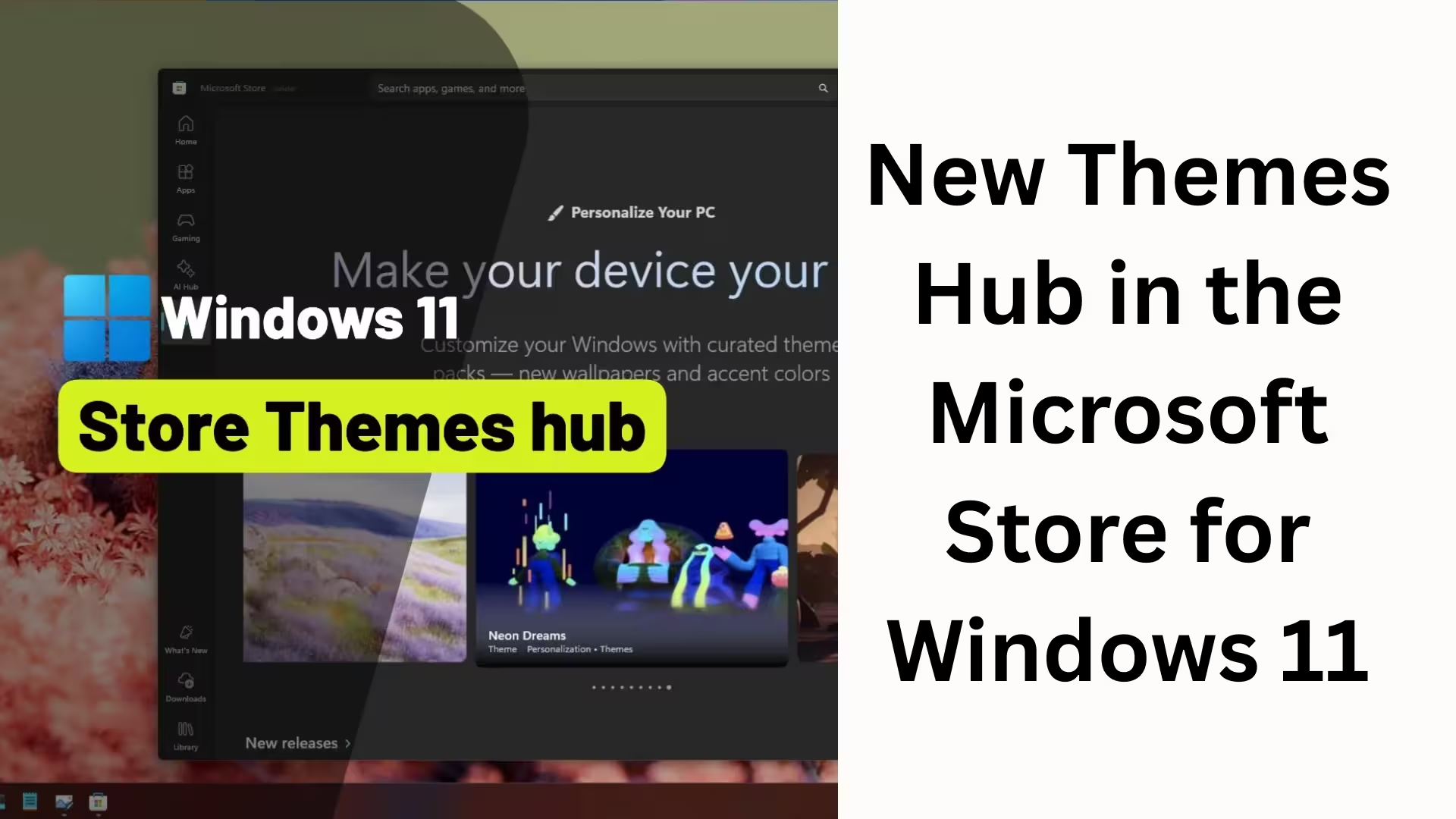
ByMicrosoft has introduced a highly useful and visually appealing update for Windows 11 users. A dedicated “Themes Hub” has now been added to the Microsoft Store, making desktop personalization easier, faster, and more impactful than ever before. In this article, we’re sharing all the essential information about the new Themes Hub in Windows 11 so you can take full advantage of this feature.
What is the New Themes Hub in the Microsoft Store?
The new Themes Hub in the Microsoft Store is a central section where hundreds of curated themes available for Windows 11 are organized in one place. Previously, finding themes was a difficult and scattered experience; now, the process is completed with a single click.
This new hub is specifically designed for users who want to give their Windows 11 desktop a unique, creative, and personal touch.
Key Features of the Windows 11 Themes Hub
Vast Collection of 400+ Curated Themes
The new Themes Hub includes:
Over 400 premium and free themes
Approximately 35 new theme collections
Nature, Art, Gaming, Festive, Minimal, and Abstract designs
Each theme includes not only wallpapers but also color schemes, sounds, and accent elements, giving the entire desktop a cohesive look.
Instant Access via Paintbrush Icon
The Themes Hub opens with a single click on the paintbrush icon located in the left panel of the Microsoft Store. From here:
Theme previews can be viewed
Themes can be downloaded and applied with a single click
Any theme can be instantly removed or changed
This experience is completely user-friendly.
How are Windows 11 Themes Different from Before?
The concept of themes in Windows is not new. It originated with the “Microsoft Plus!” package in Windows 95. Later, “deskthemepacks” were used in Windows 8 and Windows 10. But now:
Themes are offered in MSIX packages
Improved performance and security
Direct integration with the Microsoft Store
This change not only modernizes Windows 11 but also enhances the user experience.
Why is the Themes Hub so important?
The previous problem
Previously, themes in the Microsoft Store:
Were not properly categorized
It was difficult to search
New users were unaware of the vast number of themes available
The current solution
The new Themes Hub:
Displays themes in trending and curated sections
Makes discovery easier
Is beneficial for both new and existing users
Microsoft’s official statement
According to Giorgio Sardo, Vice President of the Microsoft Store:
> “We are launching a new Themes department in the Microsoft Store, where users can discover and apply curated and trending themes with a single click.”
This statement clarifies that Microsoft is now prioritizing personalization.
The right theme for every user
According to Microsoft, the Themes Hub is designed so that:
Gamers can choose themes related to their favorite games
Designers can find creative and artistic backgrounds
Fans can start their day with their favorite characters
General users can get a fresh and positive desktop experience
Special themes for the Holiday Season
Keeping the festive season in mind, Microsoft has launched some special themes:
Winter Holiday Glow
A warm and inviting experience with soft lights and winter tones.
Snow Sculptures
High-quality wallpapers based on snow sculptures.
Remix 3D Winterscapes
Modern winter themes with 3D visuals.
These themes make your desktop festive and attractive.
Windows Spotlight: The automatic wallpaper option
If you want a new wallpaper every day, Windows Spotlight is a great option. Its benefits:
Automatically changes wallpaper daily
High-quality images curated by Microsoft
Fresh look without any manual settings
Spotlight, combined with Themes Hub, takes desktop personalization to the next level.
How to get Themes Hub?
Please note:
This feature is being rolled out gradually
It may not be immediately available to all users
Keeping the Microsoft Store updated is essential
This feature will soon be available to all Windows 11 users.
Windows 11 Themes Hub benefits at a glance:
Fast and easy theme discovery
400+ curated themes
Apply with one click
Improved UI and UX
Festive and trending collections
Completely free experience
Conclusion
Windows 11’s new Themes Hub transforms the Microsoft Store from just an app store into a personalization platform. This update is for all users who want to not just use their system, but truly make it their own.
This change demonstrates that Microsoft is now focusing more than ever on user experience, customization, and visual appeal.
Want to grow your website organically? Contact us now
Frequently Asked Questions (FAQ)
Question 1: What is the new Themes Hub in Windows 11?
Answer: The new Themes Hub in Windows 11 is a separate section within the Microsoft Store where users can easily discover, download, and apply curated and trending themes to their desktop with a single click.
Question 2: How many themes are available in the Themes Hub?
Answer: The new Themes Hub offers over 400 themes, including approximately 35 new theme collections.
Question 3: How to access the Themes Hub?
Answer: Open the Microsoft Store and click on the paintbrush icon in the left-side panel. This will open the Themes Hub.
Question 4: Will all Windows 11 users get the Themes Hub?
Answer: This feature is being rolled out in stages. Therefore, some users may see it immediately, while others may get it after some time.
Question 5: Are the themes in the Themes Hub free?
Answer: Yes, most of the themes available in the Microsoft Store are completely free and can be downloaded without any charge.
Question 6: Can a theme be applied with a single click?
Answer: Yes, any theme in the Themes Hub can be downloaded and applied with just one click.
Question 7: What is Windows Spotlight and how is it different from the Themes Hub?
Answer: Windows Spotlight is a feature that automatically sets a new wallpaper every day, while the Themes Hub allows you to manually choose a theme to change the entire desktop look.
Question 8: Will the Themes Hub work on older Windows versions?
Answer: No, this new Themes Hub is only available for Windows 11. This feature is not supported on Windows 10 or older versions.
Question 9: Does changing themes affect system performance?
Answer: No, the themes provided by Microsoft are optimized and lightweight, so they do not negatively impact system performance.
Question 10: Can themes be changed without an internet connection?
Answer: An internet connection is required to download new themes, but once a theme is downloaded, it can be used offline.