
 By
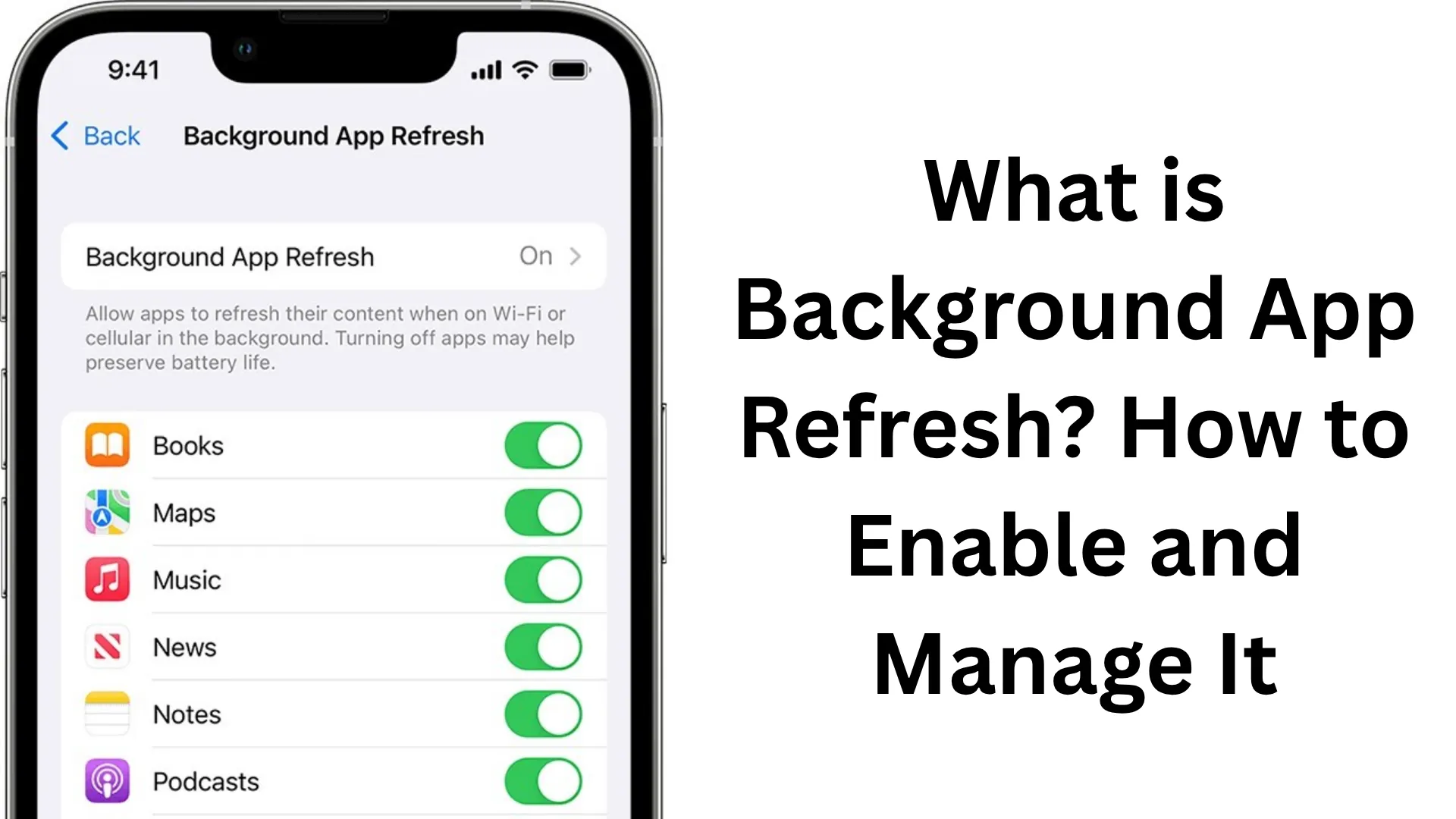
ByIn today’s smartphone era, Background App Refresh is an extremely important feature that directly impacts your mobile’s performance, battery life, and app behavior. We often observe that certain apps display updated information—such as social media notifications, emails, weather updates, etc.—without even being opened. All of this is made possible with the help of Background App Refresh.
In this comprehensive article, we will delve deeply into every aspect of Background App Refresh—what it is, how to turn it on (Enable), turn it off (Disable), and how to manage it effectively.
What is Background App Refresh?
Background App Refresh is a system feature that allows apps installed on your mobile device to update their data in the background, even when you are not actively using those apps.
For example:
The Facebook or Instagram app updates its data to display new posts without you having to open the app.
The Email app checks for new emails in the background.
The Weather app automatically updates weather information.
This means that when you open an app, you receive the most up-to-date information immediately, without any delay.
How Does Background App Refresh Work?
When this feature is enabled, your phone:
Utilizes the internet (via Wi-Fi or mobile data)
To periodically allow apps to refresh their data.
This entire process is completely automatic and occurs without the user even realizing it.
Benefits of Background App Refresh
1. Instant Updates
You receive the latest information the moment you open an app.
2. Improved User Experience
Loading times are reduced, and apps run more smoothly.
3. Real-time Notifications
You receive new messages, emails, or updates instantly.
4. Easier Multitasking
While you are using one app, your other apps remain updated as well.
Disadvantages of Background App Refresh
1. Faster Battery Drain
Continuous background activity takes a toll on the battery.
2. Increased Data Consumption
It leads to higher usage of mobile data.
3. Impact on Performance
It may cause slowdowns on older devices or those with limited RAM.
Also read: How to Enable Color Filters on iPhone or iPad?
How to Enable Background App Refresh on iPhone
If you are an iPhone user, follow the steps below:
Step-by-Step Process:
1. Open Settings
2. Tap on General
3. Select the Background App Refresh option
4. Choose from the options provided at the top:
Off
Wi-Fi
Wi-Fi & Mobile Data
App-specific Controls:
By scrolling down, you can select exactly which apps are allowed to refresh in the background.
How to Enable Background App Refresh on Android
On Android, this feature goes by slightly different names, such as:
Background Data
App Data Usage
Battery Optimization
Steps to Enable:
1. Open Settings
2. Go to Apps or App Management
3. Select an app
4. Tap on the Data Usage or Battery option
5. Toggle “Allow Background Data Usage” to ON
How to Disable Background App Refresh
If you want to save battery life, turning this feature off can be a good option.
Steps to Disable on iPhone:
Settings → General → Background App Refresh → Off
Steps to Disable on Android:
Settings → Apps → Select App → Data Usage → Background Data Off
How to Smartly Manage Background App Refresh
Turning it off completely isn’t always the right choice. We can manage it more effectively:
1. Keep only essential apps ON
Banking Apps
2. Turn OFF social media apps
These consume the most data and battery power.
3. Use “Wi-Fi Only” mode
This is the best option for saving mobile data.
4. Use Battery Saver Mode
This automatically limits background activity.
Background App Refresh vs. Push Notifications
These are two distinct things:
| Feature | Background App Refresh | Push Notifications |
| ————— | ———————- | —————— |
| Function | Updates data | Delivers alerts |
| Internet Access | Required | Required |
| Battery Usage | High | Low |
Also read: How to Download Torrent Files Using qBittorrent
When Should You Turn Off Background App Refresh?
When the battery is draining quickly
When you have a low data limit
When the phone is running slowly
When you have a large number of installed apps
When Should You Keep It On?
When you need real-time updates
When you use business or work-related apps
When you have an unlimited data plan
The Relationship Between Background App Refresh and Battery Life
This feature has a direct impact on battery life because:
Apps constantly fetch data
It utilizes CPU and network resources
Tip:
Always customize this setting based on your battery usage patterns.
Essential Tips for Saving Data
Restrict Background App Refresh to Wi-Fi only
Uninstall unnecessary apps
Use Data Saver Mode
Limit Auto-sync
Conclusion
Background App Refresh is a powerful feature that makes your smartphone truly smart. However, using it correctly is crucial. If we manage it wisely, we can not only conserve battery power but also enhance our phone’s overall performance.
Therefore, the best approach is to:
Keep it ON only for essential apps
Turn it OFF for all other apps
By striking this balance, you can optimize your usage of performance, battery life, and data—all at once.
FAQs – Frequently Asked Questions
1. What is Background App Refresh?
Background App Refresh is a feature that allows apps to update their data in the background, ensuring that you receive the latest information instantly the moment you open an app.
2. Is it a good idea to turn off Background App Refresh?
Yes, if you want to conserve battery power or reduce data consumption, turning it off can be beneficial. However, it is generally better to keep it enabled for essential apps.
3. Does Background App Refresh consume a lot of battery power?
Yes, when multiple apps are constantly updating data in the background, battery consumption increases. Therefore, it is important to keep this feature usage limited.
4. Does Background App Refresh consume mobile data?
Yes, this feature utilizes both mobile data and Wi-Fi connections. If you wish to save data, setting it to “Wi-Fi Only” mode is an excellent option.
5. For which apps is Background App Refresh essential?
We recommend keeping it enabled only for essential apps, such as:
Email apps
Messaging apps (WhatsApp, Telegram)
Banking and finance apps
6. Should it be kept enabled for all apps?
No; keeping it enabled for every app can lead to unnecessary battery and data consumption. Grant permission only to the apps you find useful.
7. Is Background App Refresh different on Android and iPhone?
Yes, while the name and settings may vary across the two platforms, the core function remains the same—updating app data in the background.
8. Can Background App Refresh slow down the phone?
Yes; particularly if your phone is older or has limited RAM, this feature can impact the device’s overall performance.
9. Does Battery Saver Mode disable it?
In most cases, when you enable Battery Saver Mode, this feature is automatically restricted or disabled.
10. What is the best way to manage Background App Refresh?
The most effective approach is to:
Keep it enabled only for essential apps
Disable it for all other apps
Utilize the “Wi-Fi Only” setting
This allows you to strike a perfect balance between battery life, data usage, and performance.

It’s interesting how Background App Refresh lets apps keep you updated in real-time, but it’s definitely something to manage if you’re looking to save battery life. I’ll be more mindful of which apps I leave running in the background.